Nursing workforce scheduling
Fair shifts. A roster that builds itself, calmly.
Nursync builds a ward's roster from that ward's own rules, so every nurse knows when they work. Nothing is published until the head of department approves it.
- MMorning
- EEvening
- NNight
The code is always shown. Colour only reinforces it.
The roster
The head sets the rules. The roster is built on them.
Nursync reads the department's rules, the leave on file and who worked the last nights, then builds the roster. The head reviews it before anyone else sees it.
- Built from your own department's rules, not from a template.
- Before it builds, it shows what it will take into account.
- Every shift gets a shift in-charge, so no shift starts without one.
- Each roster covers four weeks, and the next one starts the day after. Soon
- Edit by hand and every rule you break shows at once.
- When the head approves, the roster reaches the department and each nurse learns when they work.
Week 1 of 4
Sample 12 nurses · 28 days · Fictional ward
Shift codes
- MMorning
- EEvening
- NNight
- OOff
- ALAnnual leave
- SLSick leave
- ELEmergency leave
- MLMaternity leave
- TLTraining leave Soon
- CEContinuing education
- COVCovering another ward
- COMPCompensatory off
- EShift in-charge
The rules
Write a rule once. It holds on every roster.
Permanent rules come first and are not bent. Temporary items, such as leave asked for the next roster, are weighed after them.
- An evening shift is never followed by a morning shift the next day.
- At most 5 working days in a row. 4, then a day off, is preferred.
- Nights come in a block of up to 3, usually two, followed by 2 days off.
- A new block of nights starts at least 6 days after the last one ended. Soon
- Over one roster everyone gets each of the four weekend kinds: both days off, both on, only the first, only the second.
- 140 hours per roster. Hours beyond that are logged as overtime, and every 8 of them become one compensatory day.
- A temporary item that clashes with a permanent rule is flagged, so the head decides. Soon
Evening, then morning
EMNot allowed5 days, then off
MMMEEOAllowedNights, then 2 off
NNOOAllowed6 days between night blocks Soon
NNNNAllowedThe four weekend kinds
OOBoth offMMBoth onMOFirst onlyOMSecond onlyAllowed8 extra hours, one day
COMPAllowed
Sample The numbers are the sample's
Requests and leave
Ask for leave. The roster writes it in once it is approved.
Pick the leave type and the days. The request goes to your head of department. Once it is approved, the leave is written into the roster with its own code, and the gap it leaves shows.
- Choose the leave type and the days; the request reaches your head of department.
- When it is approved, your shifts come off the roster and the leave appears in its place.
- Emergency leave reaches the head at once as an urgent alert, with the gap it leaves and who can cover it.
- For the next roster, ask for a day off or a specific shift before it is built. Soon
Request type
Days
Mon 16/11/2026 – Wed 18/11/2026
Under reviewApproved
Your roster
Once approved, the leave is written into your roster.
Sample Fictional nurse
Swaps
A swap takes three steps, and you always get the reason.
No chasing. The rules are checked first, then your colleague answers, then the head decides.
- First the rules, automatically. A swap that would break one is cancelled on the spot.
- Then your colleague agrees, then the head of department approves.
- Asked at least 2 days before the shift, so tomorrow's duty cannot be traded.
- On the current roster, or on the next one once it is published.
- If it is refused, the reason reaches you.
- You can also hand a shift to an available colleague, through the same steps. Soon
Your shift
MMorning
Omar
Colleague's shift
EEvening
Yusuf
- The rulesChecked automatically
- Your colleagueAgreed
- Head of departmentAwaiting
If a rule would break
EM
Evening, then morning the next day, is not allowed. The swap is cancelled and the reason reaches you.
Sample Fictional nurses
Coverage
A gap in the roster? The search for a substitute is done for you.
When someone is absent, Nursync sees the gap and proposes who can fill it without breaking a rule.
- It lists the colleagues who are available, with the reasons for each name, never a percentage.
- The offer reaches the nurse, who accepts or declines. The head approves, and the roster updates.
- Whoever takes a night also takes the rest that follows it. Fairness follows the shift. Soon
A shift is short
Dina is on emergency leave
Available1Needed2
Colleagues who can cover
Omar
- Available that day
- Within the limit of working days in a row
- No forbidden shift sequence
Nour
Adam
- Gap found
- Substitute proposed
- Nurse accepts
- Head approves
- Roster updated
Sample Fictional nurses
Head of department
The head's desk: everything waiting for a decision, in one place.
One screen shows how today is covered and what needs an answer: leave, swaps and nurses applying to join the department.
- Today's coverage for each shift, with any shortfall in plain sight.
- Staff nurses who apply to the department are reviewed by its head.
- A notice to the department's nurses is one message away.
Coverage today
Awaiting your decision
Emergency leave Urgent
Dina · EL · Sun 08/11/2026
Leave request
Lina · AL · 16/11/2026 – 18/11/2026
Swap request
Omar Yusuf · Tue 17/11/2026
Nurse applying to join
Ziad
Sample Fictional nurses
Notifications
A notification that is yours: when you work.
Nobody is sent the same alert again and again. You hear about your own shifts, and about changes to them.
- When a roster is published, your phone tells you your own shifts.
- When it changes, the notice says exactly what changed, and only the people whose shifts moved are told.
Sample Fictional nurses
Operations center Soon
For the platform team: one operations center.
A single place to follow the platform: each hospital and its departments, joining requests, the health of the service, and notices to everyone, to a hospital or to a department.
- Platform figures and the state of every hospital. Soon
- The health of the service at a glance. Soon
- Notices to everyone, to one hospital or to one department. Soon
- Today the platform administrator already manages accounts: delete, return to verification, move between departments, change a role.
Hospitals
Departments
Users
Requests
Service health
- Server
- Notifications
Sample Soon Outline, no figures
Assistant Soon
Ask in your own words. The assistant proposes. You decide.
The head writes in Arabic or English, for example to give a nurse a day off. The assistant turns it into a proposal. Who works which shift is decided only by the scheduling engine, and nothing is published without the head.
- You ask, in your own words. Soon
- The assistant turns the request into a clear proposal. Soon
- Only the scheduling engine decides who works when. Soon
- You confirm. Nothing is published before that. Soon
Make Sara off on Fri 13/11/2026
Proposal
Sara off on Fri 13/11/2026. The department's rules are checked before anything changes.
Apply the proposalReject
- 1You ask
- 2The assistant proposes
- 3The engine decides
- 4You confirm
Sample Soon Outline, not built yet
Privacy and security
Your data, in plain words.
The promises of the privacy policy, in short. The policy has the full text.
- Only what a roster needs
- The app holds your name, your work details, your shifts, your requests and your messages. It has no place for patient records.
- No location, no tracking
- We do not collect your location, we do not track you across other apps, and we sell your data to nobody.
- Each hospital is a separate world
- Colleagues in your department see your roster. Another hospital sees nothing.
- Closing your account is yours to do
- Close it from the Profile tab in the app, or on the account deletion page.
- Sessions end
- Staying signed in lasts up to thirty days, and ends sooner when you sign out.
- Encrypted in transit
- Every connection between the app and the server uses HTTPS, and session tokens are stored hashed.
- Encrypted backups
- Backups are encrypted and rotated out within thirty days.
- A trace for administrative changes
- Sign-ins and administrative actions are recorded: who changed what, and when.

Every nurse knows when they work.
Get the app and open your roster.
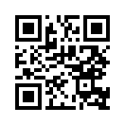
Start from your phone
The Nursync app is for nurses and heads of department: your roster, your requests and your swaps in one place.
- Get it onGoogle Play
Coming soon to the App Store
Android APKInstall directly on Android, without the store.
The page opens the right store for your phone.